Two months of building, an evaluation rubric for second brains, and a lot of lessons learned to tell the gimmicky from the useful.
The second brain is an eighty-year-old practice that was given a name ten years ago, and that has come back into fashion in recent months. There is no end to the posts that sing its praises, compare the tools or share the latest organization trick. They all show how to do it. None of them says what it lets you do. So I took the problem the other way around: first write the rubric that evaluates their capabilities, and then build my own second brain. It took me about a hundred hours this summer. I’ll tell you about my journey, and give you what you need to build yours, without the marketing.
In this article we will see:
- Where does the concept of second brain come from?
- What technology has unlocked, and what a second brain is in 2026
- Why I started by writing a rubric
- The evaluation rubric
- Where to start, if you want to build one
- My setup, and what it enables
- So now, what do we do with all this?
June 2026. For the third time this week, I come across the expression “second brain”, used by three people who don’t give it the same definition.
For the first, it’s a well-organized folder. For the second, an artificial intelligence that remembers everything. For the third, a method you buy through its training course, with modules and a certificate.
But all 3 have in common the promise of saving time and improving quality.
With all the challenges coming up after the summer break, building a second brain seemed like good summer homework, and it largely overflowed the time initially planned during my kids’ nap time.
So, here we go, let’s build our second brain.
But before we start, what is it?
1. Where does the second brain come from?
At a very basic level, second brains started out as archiving systems, so that their authors could always find what they had written or thought. Three people laid the first three bricks of the concept, but each of them ran up against the technologies of their time.
Creating organic links between subjects
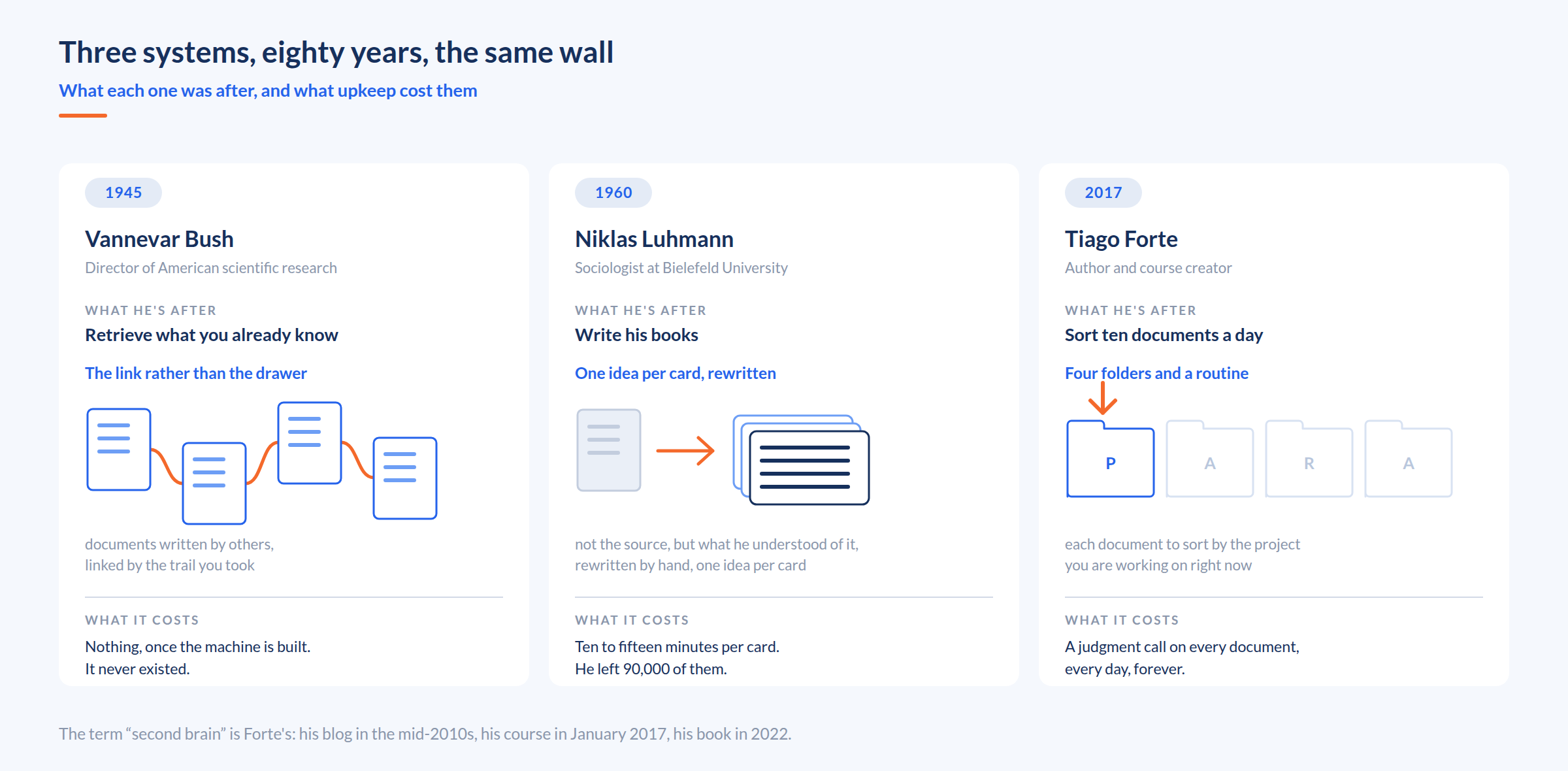
Vannevar Bush led the American scientific research effort during the war. His problem is that of a man who steered thousands of researchers: science publishes more than anyone can read, and the usual filing into drawers makes what we already know impossible to find. His goal therefore fits in one verb: retrieve. In July 1945, in The Atlantic, he describes a machine he calls the Memex. You link two documents by typing a code, and from then on the two pages call each other up forever. And over time, you end up with entire trails of documents that follow one another, because they are connected to each other.
Rephrasing ideas, to make them your own
Niklas Luhmann goes one step further, with an entirely different goal. He is not trying to retrieve, he is trying to write. His slip box is the workshop where he makes his books, and he talks about it as a working partner. He was a sociologist in Bielefeld, and he left some 90,000 paper cards the size of a postcard. Where Bush linked documents that others had written, Luhmann never kept the source: he kept what he had understood from it. In other words, he rewrote each card in his own words, in complete sentences. It was then slipped in behind the card it was responding to, just like Bush.
And it is the rewriting that does all the work: by rephrasing, he made the idea his own instead of simply archiving it. A card reread ten years later came back to his memory immediately, because the effort of understanding had been made at the time of writing. Except that this is where things get tricky: he estimated ten to fifteen minutes of rewriting per card. 90,000 cards. It was a colossal amount of work to build and maintain his second brain.
Categorizing and filing, with routines
Tiago Forte has neither Bush’s problem nor Luhmann’s. His is a problem of daily triage: he has to process ten documents every day, and he has to decide which ones are important without spending his life on it. He first introduced the concept of second brain to describe his setup on his blog in the mid-2010s, and in January 2017 he launched the first session of his course Building a Second Brain.
In his 2022 book, his method fits into four folders: Projects, Areas, Resources, Archives. To these folders he adds a four-step routine, which he sums up with the acronym CODE: capture what struck you, organize it into the project it will serve, distill it by highlighting a little more with each rereading until only the essentials remain, then use it to produce something.
But by his own admission, this kind of system often ends up collapsing: “if your organizational system is as complex as your life, then the demands of maintaining it will end up robbing you of the time and energy you need to live that life”.
Let’s be realistic: the most likely thing is that you’ve never heard of these three systems. That was my case a few weeks ago. Why? For two very simple reasons.
- the value comes from rephrasing and manual linking, never from storage. -> which rules out Bush
- and that work takes more effort than it saves. -> which rules out Luhmann and Forte
2. What has technology unlocked?
Three locks have given way, the first in the 2010s and the next two almost at the same time, at the beginning of 2026.
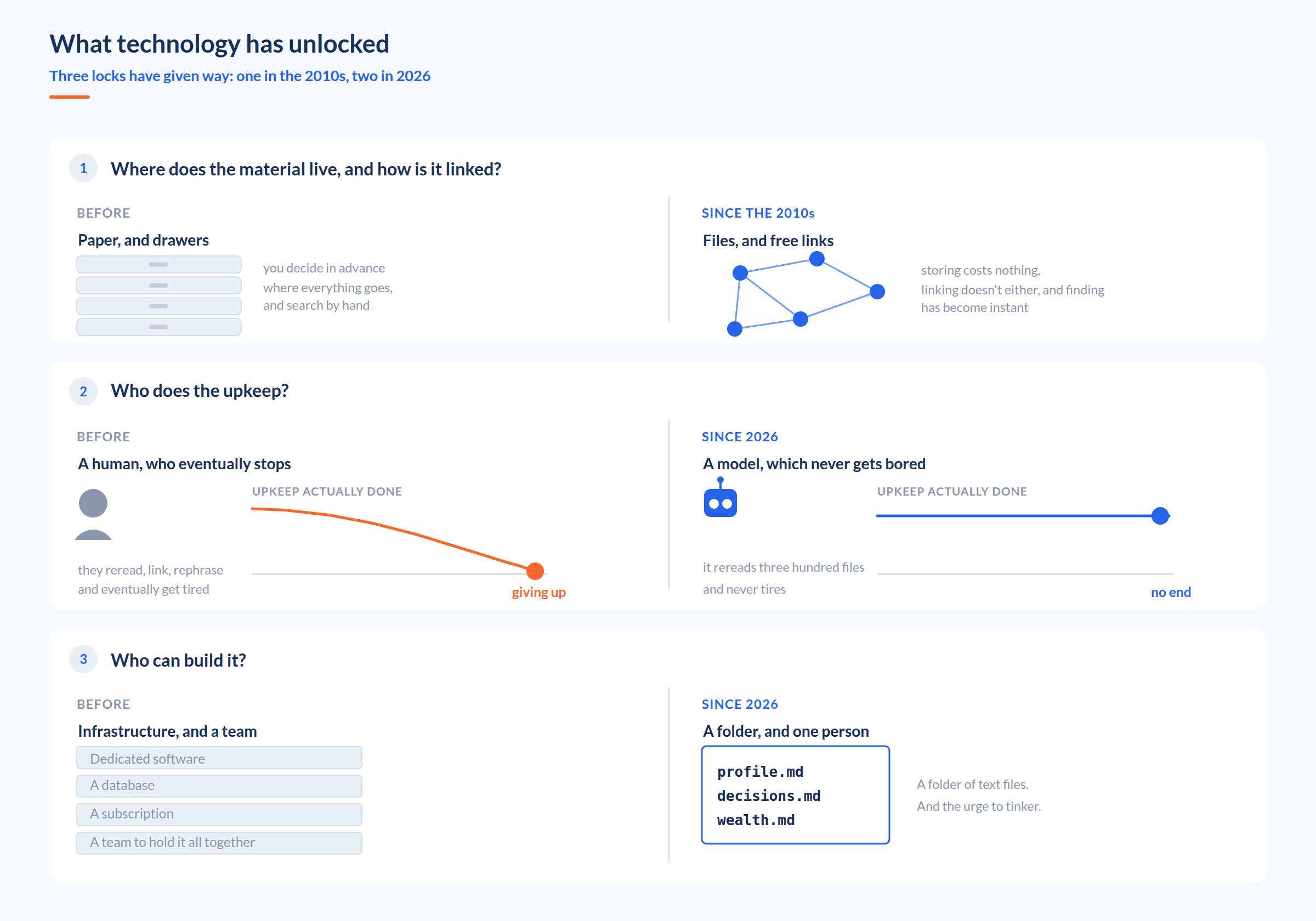
The first: storage and links are digitized and simplified
No more sheets of paper and never-ending drawers. Evernote opened its online service in 2008 with a promise that fit in two words: remember everything. Roam Research in 2019, then Obsidian in 2020, made the link between two notes free and allowed people to build explorable graphs. So storing no longer costs anything. Neither does linking. Searching for and finding content have become instantaneous.
The second: LLMs can now read and write files themselves
Until then, we gave them a text, they returned a text, and it was up to us to put it in the right place. Today we give them a folder, and they can organize it and work in it completely autonomously. They do precisely the work no one was doing: rereading three hundred files to rephrase them, update them and look for a contradiction in them, all without any effort and without getting tired of it after six months.
The third: you no longer need to be a developer
For twenty years, building these systems required dedicated software, often a database, and costly infrastructure. Since the beginning of 2026, consumer tools do it without needing a single line of code: Claude’s project spaces, Hermes in your phone, OpenClaw that you host on your own machine.
Beyond their differences, these systems have one thing in common: the material remains text files in a folder, readable by the user. No proprietary format, nothing to export the day you change tools.
What used to require a team now requires a folder, the urge to tinker, and almost nothing else. That’s why the topic has been coming up so much over the past 6 months.
So what is a second brain in 2026?
At the most basic level, it is a place outside its owner’s head where what they think is written down, linked to the relevant concepts, and findable by someone other than them. And all the more so by a machine they can query.
A conscious and autonomous assistant like Jarvis is a second brain, but simple text files with automations are also a second brain.
For example, Andrej Karpathy, former director of AI at Tesla, published on April 4, 2026 the code that runs such a system. He breaks it down into 3 layers:
- the raw sources, which are never modified;
- plain-text notes that the model keeps up to date;
- a rules note that says how all of this is written.
And three actions that the model performs.
- Ingest: a source comes in, ten to fifteen notes are updated.
- Query: you ask your question to the notes, not to the sources.
- Review: the model goes back over everything and flags contradictions, outdated claims, orphan notes.
In his case, a second brain is a bit of code that runs, and text files.
It’s all just a matter of degree of implementation. And that degree is what the rest of this article will measure.
3. Why I started by writing a rubric
Now that we have the beginning of a definition, and a few broad leads in terms of usage, we need to decide what my second brain is going to look like.
Knowing that there are dozens of second brain implementations…
A Notion template with four linked databases. An Obsidian vault with its links, its graph and its plugins. Karpathy’s llm-wiki with two hundred lines of code. GitHub repositories that plug an agent into a folder. Graphs of agents and sub-agents. Each one shows a how. None of them says what the result is supposed to produce.
On what criterion should you choose one or the other? How do you reconcile these different implementations? Especially since each system is the consequence of its creator’s constraints and needs. And so it will, by nature, have characteristics that won’t suit me.
So I decided to take the problem the other way around. Rather than looking for what to build, first define what this system must produce. And depending on what makes sense for me, build the necessary tools, or not.
So the question is not which modules to implement. It is: what can I do today with this system that I couldn’t do yesterday.
4. The second brain evaluation rubric
Building the rubric was more complex than anticipated, because in brainstorming sessions, Claude has the immense advantage of very strong reasoning abilities, but it sometimes forgets that not all of us humans have an IQ of 160 with a perfect context window of millions of tokens.
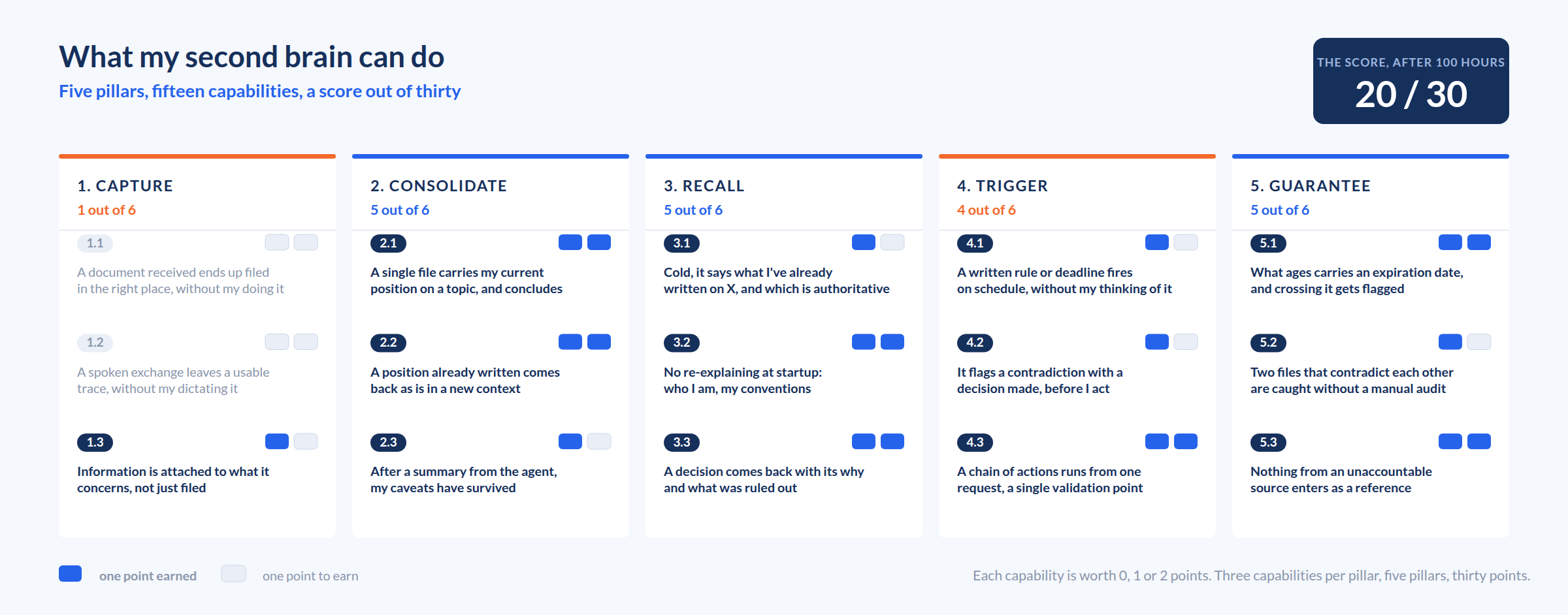
After several iterations and simplifications, I arrived at the following 5 pillars:
1. Capture: without me thinking about it, the system must manage to capture information.
For example: a document received through a usual channel ends up filed in the right place and usable, without me dropping it there myself.
2. Consolidate: the elements added must organize themselves and enrich existing elements.
For example: on a subject I’ve thought about several times, a single file contains what I currently think, and it is able to draw a conclusion.
3. Recall: the system must then be able to produce information deterministically.
For example: cold, without me pointing to any file, it answers “here is what you’ve already written about X”, and what it says is authoritative.
4. Trigger: the system must be able to produce elements without me asking.
For example: it flags a contradiction between a new intention and a decision already made, before I act.
5. Guarantee: the system must be able to certify what happens inside it, to keep it relevant over time.
For example: two files that contradict each other are spotted without me doing the audit by hand.
Each pillar then breaks down into 3 capabilities, 15 in all (see the details in the link below). And each capability can get 3 scores:
- 0: I can’t, or I rebuild everything by hand.
- 1: I manage, but by pointing to the files, by prompting again, by piecing several sources together.
- 2: the system does it alone, from end to end, and I can rely on it.
If you’re interested, here is the detailed rubric, with its 15 capabilities, and all the subtleties of the evaluation. Paste it into your system and ask it to evaluate itself: you’ll get a score out of 30. This rubric will also serve as our starting point for the tutorial that follows, to build the second brain.
In hindsight, the few hours spent building this rubric are the best investment of my whole summer, and I keep using it to improve.
5. Where to start, if you want to build one
Several orders are possible, but here is how I would go about it if I had to start over from scratch.
My recommendation is to use no database, no app that stores things for you, no proprietary format. Just .md files, readable by you, by any model, and by the next tool that comes out. The model (Claude or another) is just an engine you plug into it: the rules, the instructions, the logs, everything lives in the folder, in text format, and nothing in the tool’s memory. (and it will save you a lot of trouble, I know it, because I accidentally deleted all my Claude data midway through the process; since everything was saved on the disk, I recreated my projects and their mechanics in 20 minutes)
Step 0 — Use Claude and get familiar with Cowork
Start by buying a Claude subscription, to get access to Cowork, and download the desktop app. Build at least 2 Cowork projects, locally on your PC:
- an “ImproveClaude” Cowork project that will have full access to all the spaces you want to open up to Claude, as well as to your “Documents\Claude” folder
- at least one Personal or Work project that will be used to build your deliverables and store your ideas, to help you in your life. I recommend creating one Cowork project per major “watertight” theme.
Step 1 — Create a Deliverable folder that contains the instructions of your Cowork projects
To make your system aware of its own features and capabilities, the instructions of your Cowork projects must be generated (and therefore visible) by your “ImproveClaude” Cowork project. Explain to ImproveClaude that you want it to write your Cowork project instructions, and then simply get into the habit of copy-pasting these instructions, which it will keep up to date, into your projects in the Claude app. This step is critical to building your second brain: it’s what will make the difference with an agent that merely answers correctly.
From here on, all the following steps are to be carried out in your ImproveClaude Cowork project, so that it can apply them a first time and then systematize their application in the future. It will also take care of checking that they are consistent with each other, and of guiding you in your implementation choices. So don’t do these steps by hand yourself!
Step 2 — Separate two types of files, and never mix them
On one side, dated “deliverable” files. They keep a trace of what you think at a given moment, and they are the default deliverables of your exchanges with Claude. On the other, one “topic” file per subject: wealth.md, family.md, investment.md. It carries the current state, is written in the present tense, and is enriched incrementally from several dated files. Explain this distinction to your ImproveClaude project so that it can put this convention in place.
Step 3 — Write each rule in one place only
Start by creating a rules file. And the first rule is that a rule that applies to several subjects lives in a common folder, and each space points to it instead of copying it. Otherwise the two copies drift apart, and that’s where the problems begin. For example: step 2 applies everywhere, in each of your projects. So it’s better to write it only once, in a “cowork_conventions.md” file that will be read at the start of each Cowork project. And it’s the Cowork project instructions (generated by ImproveClaude) that will call this file and anchor this practice.
Step 4 — Give each living note an expiration date
Alongside the update date of your files, add a second line: a deadline, an expected event, or a named condition that indicates its content is no longer valid. Then create a cross-cutting task that goes back over these conditions and checks them, to make sure the content of your second brain always stays up to date. Without it, a second brain becomes a very tidy cemetery, which is exactly the trap Forte saw his own readers fall into.
Step 5 — Keep a decision log
Build a file with one line per decision, with the date, the rationale, and what was ruled out. For my part, I built one decision log for work, one for my personal life, one for building the second brain itself, all fed automatically by Claude. Their value is not the archive, but forcing me to spell out why I settled a given point. And over time, they teach the system how I work: its accuracy goes up a notch on everything else.
Step 6 — Say where the agent is allowed to write, and where it can only propose
When information comes from an external source (the web, a forum, a summary written by a third party), the agent is not allowed to modify my “topic” files. It is only allowed to propose. It writes its findings in a dated proposals file (“deliverable” type), and I’m the one who decides whether to take them on board. The nuance seems thin, but it changes everything: it makes it possible to open up automations that would otherwise make a huge mess of my most important files.
Step 7 — Have automatic tasks keep a log, from the very first one
Create a logbook per task, where it writes down what it did. That’s what lets you check that it’s still running, and above all that it isn’t drifting. It allowed me to catch read and write errors in my backlog reviews that I would never have seen otherwise.
Step 8 — Plug in off-the-shelf tools, and only at the end
Add a backlog (Trello, Notion, Airtable) so that Claude reads and writes tasks between two sessions, with new entries in a “Claude proposal” status so as not to pollute the list. I also added a CRM, so that it knows the people I mention and encourages me to keep my network alive. These modules exist off the shelf, they’re free or almost, but they remain gadgets as long as the previous seven steps aren’t in place. You can then add more modules and connectors according to your specific needs.
So, what you should absolutely not start with: the tool. It’s the classic mistake that makes the quality of the content produced and the maintenance effort weigh more than the value generated. And it’s also the approach that half of the content on the subject is selling.
6. My setup, and what it enables
Once you’ve done all that, you should reach a score in the same range as mine: 20 out of 30 on the rubric above.
In concrete terms, your setup will look like a set of folders and text files on your hard drive. Nothing else. A bit like Karpathy. On my side, that’s 274 text files: 174 dated deliverables, which I never rewrite, and 100 living notes, which carry the current state of a subject. 80 of them have an expiration date and update themselves. Six Cowork projects read them and use them as a source, ten scheduled tasks maintain and enrich them.
The main areas for improvement are “Capture” and “Trigger”, which require connectors and automations, or which are simply too complex. For example: how do I simply capture and log all my conversations?
What it looks like in practice, from end to end
I like a post on X that talks about investment strategy. I do nothing else with it, and I forget about it within a minute.
A few days later, I have a task that reviews my recent likes. The agent finds this post, and identifies its subject. It connects it to my interests and goes looking for other information to better understand what the author is really proposing. Then it weighs this proposal against my convictions and my investment ideas that are already written down, notes the points of divergence, and goes to read the decisions I made earlier on the same ground. Its conclusion: in light of my investment thesis, it’s a bad idea, and it’s not worth changing anything.
The useful output of my second brain, that day, was to tell me to do nothing, and to explain why.
The same mechanism, on the work side
I receive an email from a client asking me for an update on a commercial proposal. My second brain looks through my emails for the requested feedback, opens the right client folder, knows my opinion and my constraints on the subject, and directly creates a new, updated commercial proposal. And for the uncertain elements, it makes suggestions to me. After I approve, it then drafts a reply for me that matches my tone and my level of language. Total time: 5 min.
7. So now, what do we do with all this?
That’s where I stand after my hundred hours this summer, with a system that helps me consolidate a lot of information, and generate my work and personal content in a fast, efficient, reliable and semi-automated way.
Clearly, I don’t have a Jarvis in my helmet anticipating all my needs. But does that mean we can say I’ve built a second brain? A priori yes, in the sense I defined above: it is indeed outside my head, with relevant, updated, linked content, and a machine knows how to find it without me.
And if someone asked me today what a second brain is, I would probably answer that it can be just about anything, and that technology changes what it is made of very regularly. What doesn’t change are the capabilities that must emerge from this system. That’s exactly why the rubric still holds: I use it to gauge the systems I come across, to filter what they offer, and to keep what they do better than mine.
But now the key point: does this second brain really save me time? My rubric simply evaluates what it can do, not whether it is useful. And those are two very different things.
I’m convinced it does, but it’s extremely difficult to evaluate what such a system lets you gain. And the only rigorous evaluation of context files published to date even reaches a negative conclusion: ETH Zurich and LogicStar, February 2026, 138 situations drawn from 12 real projects. “Providing context files does not generally improve task success rates, while increasing inference cost by over 20 % on average.” So I’m satisfied, but I remain rather humble about what I’ve achieved, and I keep moving forward.
But just like Bush, Luhmann and Forte, I will soon run up against a new technological wall, and each additional point is going to cost me more and more. They ran into paper, into the quarter hour of rewriting, into a routine heavier than the life it was meant to serve.
I don’t know yet what I’ll run into, or when. And the real difficulty will be knowing how to stop before that.
Main sources: Vannevar Bush, “As We May Think”, The Atlantic, July 1945 · Niklas Luhmann, Zettelkasten, Bielefeld University · Evernote, launch of the service in 2008 · Tiago Forte, first session of “Building a Second Brain”, January 2017, book of the same name in 2022 · Roam Research, 2019 · Obsidian, 2020 · Andrej Karpathy, llm-wiki, April 4, 2026 · ETH Zurich and LogicStar, arXiv:2602.11988, February 2026, revised in June.