You have probably seen the Underscore video about the person who developed applications with zero technical knowledge, all of it with AI:
Reality? Fiction? Everyone is free to judge, but testing it yourself is still the best option.
So here are the results of my test: developing a web application with AI.
Disclaimer: an engineer by training, I coded during my studies, I can read code, I work on application projects and I have a good understanding of the IT world in general, but I don’t code at all.
1. Find an app idea — 20 min
Yes, it may seem obvious, but to develop an application, you first need to know what to develop.
And what better than ChatGPT to ask it to identify the aspects of your life to automate and improve.
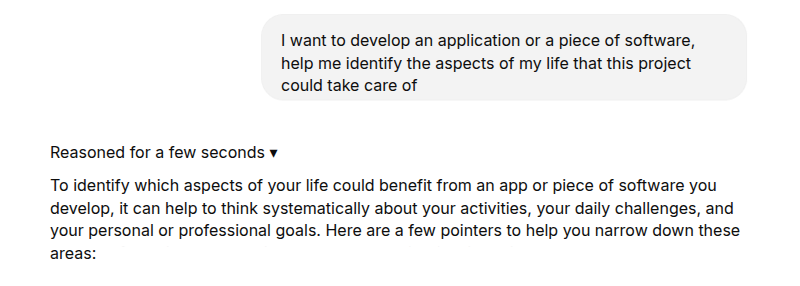
After a few back-and-forths, I set out on an idea for a web application that would let me:
- retrieve the list of my reads on Kindle
- add other books manually
- manage reviews and comments on the books
- gamify the reading experience with challenges
There are certainly online applications that already do this, but it seemed like a relatively simple idea to get started.
2. Identify the precise features to develop — 5 min
Once again, starting from the idea of a book manager, it is very easy to ask ChatGPT to write functional specifications.
It then suggests detailed features, screens, and writes it all up in a very structured way:
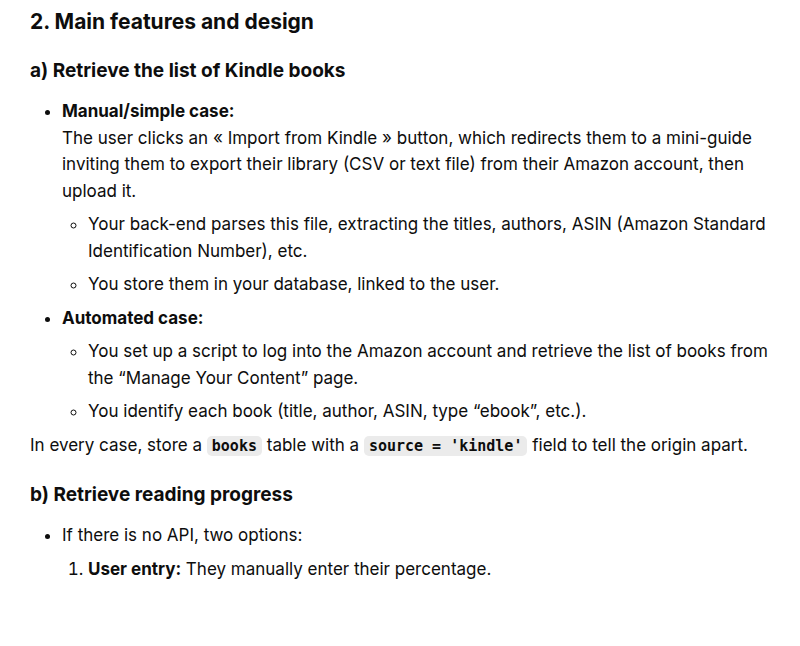
It even suggests technical specifications, with the various tools I should use (which I am not going to take into account).
3. Start developing — 30 min
In the Underscore video, he explained he had worked with agents through Crew AI, so I create a (free) account and start browsing the application.
Not really seeing how these agents could develop in a vacuum, I figure out that I also need to use Cursor as the development platform.
Knowing absolutely nothing about the tool, I watch a Cursor tutorial to understand the basics of the application.
1st surprise: after installing Cursor, I have to download Node.js so the application can run.
After a few back-and-forths to deal with access rights issues, installation location problems, and two PC reboots, here are Cursor and Node.js installed and up and running.
I then discover that Cursor already has LLMs you can chat with, and they are the ones who will be in charge of developing my application.
Crew AI will be of no use to me on this project. Maybe agents could have helped me go faster, but that won’t be for today.
I copy and paste into Cursor the functional specifications generated by ChatGPT, and I ask it to start working.
4. Start developing (for real?) — 1h
For a newbie, Cursor is a pretty incredible tool. From the instructions given (the specifications of my tool), it identifies on its own the tasks to carry out, creates the necessary folders and files, and starts writing code.
For the application to work, it figures out that I need to download PostGreySQL, and even gives me the download link directly (how reliable is that recommendation??).
I comply, but I then run into authorization problems on my PC, and despite all the workarounds suggested by Cursor, I can’t get the application to launch (yes, you can share a screenshot of your screen with it, and it then suggests solutions).
I won’t mention here the few tweaks made directly on the command line, in case my CISO reads this article…
Cursor then suggests going through another technical solution, SQLite, to get around this problem. Is it the best option? I don’t know. If so, why not suggest it from the start? I will never know.
5. Start developing (for real!) — 15 min
Cursor then starts creating the tables, the data model, the home page, and everything seems to be going as well as possible. I see things related to the “Prisma” database go by, even though I was supposed to use SQLite, but I don’t ask myself too many questions, I keep going.
Cursor’s great strength is that there is literally nothing to do. At first, it asked for my permission to modify code files. But I quickly told it in the settings that it could carry on alone; in any case, I am quite incapable of judging its choices.
There is still a safeguard: every 25 operations, it lifts its pencil and asks me to confirm that it can keep going. But those 25 operations can amount to a good 10 minutes. 10 minutes during which it writes, modifies, tests, fixes and starts again, on dozens of files in parallel.
Because yes, there is something very surprising about Cursor: it detects its own mistakes and fixes them. On its own.
Then comes the big moment of the local test, on the famous localhost:3000.
6. Test the V1 of the code — 45 min
I open my Chrome browser, I go to the requested local address and there… nothing at all. The code didn’t compile, unknown calls are all over the code.
Interesting detail: Cursor lets you see, as you go, how many complex prompts (~exchanges in the chat) you have used. To give you an idea, getting to this stage took me about ten prompts (only!).
But debugging the home page so it wouldn’t land on the default Node.js message took me about ten more prompts. All that to get to a blank page with a “log in” button after 45 min.
Not to mention my poor PC, huffing and puffing like it can’t take any more, at 90% RAM usage.
I create my account on my application, with a username and a password, I am recognized, and here I am in the application.
7. Enrich the application and debug — 2h
Once this technical hurdle was cleared, it was time to really develop the application with all the requested features. And improve the visuals.
For that, all you have to do is ask it. In French. With a prompt as dumb as “now, develop the features and improve the visuals.”
And the craziest part is that Cursor understands. It goes back to the initial instructions and tackles developing each of the requested features: adding a book, deleting a book, managing reading goals…
And, in parallel, improving the user experience.
On my side, I have nothing else to do but watch it work and check from time to time that the application runs properly on localhost:3000.
And Cursor’s way of working is quite interesting. It dives into first drafts of features, then refines them as it rereads its own code and identifies bugs. After the first prompts on Claude 3.5, I switch to Claude 3.7, which has the advantage of explaining more clearly what it is doing, but I don’t notice any significant difference in the content.
8. So now what?
It has now been 5h that I have been “developing” my application, so where am I?
Features are being added one by one, but it is still just as laborious. For each new feature, I need more and more back-and-forths and fixes to make it work.
And for a reason I don’t know, and that Cursor doesn’t seem to understand either, the graphical display just won’t work. And I am starting to get tired of sharing screenshots of the bugs it created, and of testing an umpteenth workaround. And I think I will stop there on this project.

Conclusion
Did I do more with AI than if I had been alone?
Yes, without a doubt, I would never have taken on such a project alone
Did I get where I wanted with AI?
Not really, the application doesn’t work, and has no visuals
Does AI solve every problem?
Yes and no. Yes, with time and elbow grease it ends up understanding the problem and finding a solution, but no, the problems are often themselves the consequence of the AI’s lack of foresight, and its solutions are sometimes a bit borderline in terms of security.
Can AI develop an application on its own?
With zero knowledge, AI that codes on its own is not yet within everyone’s reach, without a big dose of motivation and elbow grease.
Is the developer job at risk?
It is certainly still too early to say, but from my experiments, devs won’t be replaced by the average Joe or Jane, at least not this year. The technological barrier is still too high for newbies. Rather, the high-performing devs who have managed to make the leap to AI will become extremely high-performing and replace the bad devs. So we will need fewer devs.
In any case, this little dev adventure helped me better understand the current state of the technology, what it can do, and what it can’t do. And given how fast AI is progressing, it is very likely that in a few months, the result will be very different!